



The update to Garmin Connect is long overdue, and users will be pleasantly surprised to see colour-coded activity cards, a dashboard that is easily customisable and a simple way of comparing your data.
Cycling app of the week: Garmin Connect Mobile
Hack: How to restore your desktop Strava feed into Chronological order
The activity cards show your most important stats at a glance, with different colours for each activity. To delve deeper head to the ‘My Day’ dashboard, where you can view other stats such as heart rate, sleep and calories burned. You can remove or pin items to the top of your dashboard with just one click.
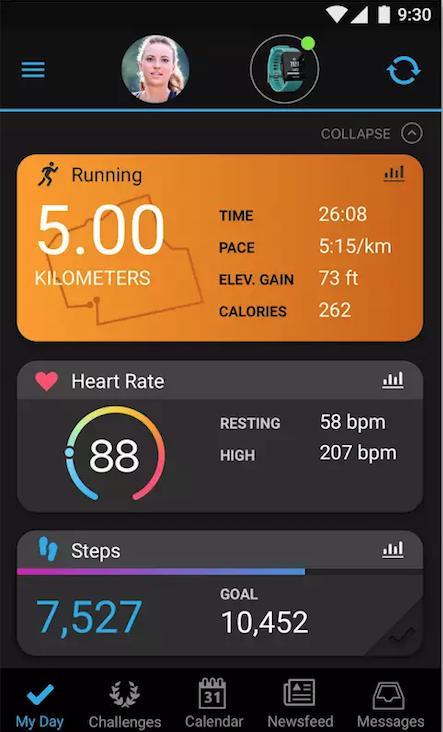
Underneath My Day is a 7 day comparison chart, with your number of activities, average calorie burn, weight, steps and heart rate all viewable at a glance, assuming you’re using a device that will record all of this.
Garmin Connect may have seen a Myspace-style decline in terms of social interaction on the platform to pave way for the mighty Strava, but there’s still a strong reason to use both apps simultaneously: there’s a whole load of metrics you can analyse on Garmin Connect that aren’t viewable on Strava if you use a Garmin watch daily, such as sleep tracking, calories in and out and heart-rate averages. As this update is strongly geared towards those who track day-to-day, it appears Garmin are happy with customers using Connect Mobile for analysing activities long-term and then using Strava for immediate post-ride analysis and KOM-chasing…




10 thoughts on “Garmin Connect mobile app gets a revamp with colourful new dashboard”
Genius move making the
Genius move making the colours alomost the same in, for example, sleep monitoring.
And for the love of God, how hard it is to work out that putting the day in, not just the date, on screens is just basic common sense. Clearly listened to none of the Bata user feedback then eh?
Garmin really does seem to have lost the plot when it comes to actual practical use, in favour of a (partial) victory of presentation over content.
Yeah, they don’t give a shit.
Yeah, they don’t give a shit.
The last update of Connect I had, a couple of months ago, stopped my Fenix talking to it, meaning *horror* manual updates. The Garmin forum was full of other users complaining about exactly the same thing, with various gizmos, and it was peppered with useless bastards from Garmin asking questions which had already been answered on the forum and complaints on Google reviews.
Thank fook for users more switched on than them, one of whom pointed me in the direction of an old version, which I rolled back to, and I disabled automatic updates of Connect.
I’ll give this version a go, as I’ve got time to roll it back today if it’s a mess, and surely something they’re pushing like this can’t have had the lax QA that that other version did.
But if you judge by actions, you have to arrive at the conclusion that Garmin hates its customers. I’m in an abusive relationship and I’m trying to find the strength to leave, but continually making excuses to stick around. That Fenix 5X is a cracking watch, though…
Garmin is a weird
Garmin is a weird organisation, about which I don’t know a lot. However, I use their marine products a lot, which are, agruably, class leading and actually work well and reliably. I can only imagine it’s a very “siloed” company in which the sensible people who make good stuff don’t talk to the kids who make the crap that is Connect etc.
Oh and yes, you reminded me – my Forerunner won’t talk to connect following the update; more crap. I did think about a Fenix, but just wasn’t prepared to lay down that sort of cash on a thing with such awful software etc behind it. On my 230 the HR is pretty random, the sleep monitoring is probably about 50% accurate, 50% from space, the VO2 stuff is a complete joke, and about 1 day in 10 it just loses all data at random. As a result it’s little more than a glarified step counter as trying to do anything more intelligent with it it just a massive pain in the arse punt. And also, the varience in data generated between it and my Edge 800 for any given ride is ludicrous.
I think their segmentation is
I think their segmentation is spot on – I fall properly into their marketing traps. Every now and then a product will come along that has a function that I *need* and does something that another Garmin won’t quite do. The Fenix being a case in point – the cheaper models didn’t turn my head, but the maps on the 5X have been a boon for my long/trail runs. Combined with indifferent customer service, I do feel like a cash cow (the Fenix hasn’t missed a beat… Yet…)
Software and firmware updates occasionally properly fix things, but there’s sod-all info from Garmin about the bugs in the first place, let alone which ones the updates will address.
This latest Connect is talking to my Fenix OK,so might be worth a go for your FR, if you hadn’t already. If it’s this version that’s messed up, the previous ‘safe’ version on Android I used was 3.20.3 – can be downloaded from APKMirror.
davel wrote:
It’s the latest version (out this week) that’s not playing now. I’m using their stuff on Mac, which I think just makes things 10x worse and it’s all an afterthought I think.
BarryBianchi wrote:
Ah..
The one consolation in the ubiquity of Garmin fuck-ups is that others will be suffering the exact complaint you are, and someone has probably figured out a way round it. Could be worth a Google.
davel]
You’re absolutely right. I usually give it about a week till the annoyance level becomes too much to take, and by then someone, somewhere, will hopefully have done Garmin’s job for free and fixed their crap. By the by – have you ever tried using Garmin’s own on-line help? Utterly hilarious. Sort of…
I normally get as far as the
I normally get as far as the forum, see about 5 threads with the same issue I’ve got, notice a Garmin monkey paying lip service to sorting it, and follow the instructions of punters who seem to know what they’re doing.
Roll on the day – and surely
Roll on the day – and surely it must be soon – when someone launces a viable decent waterproof /tough phone/GPS/Satnav combo with a half decent battery life and Ant+ and all that crap with a cheap and effective movable mount that just actualy works. Even I’d pay decent money for that.
Amen to that.
Amen to that.
TBH I’d settle for a superior bike navigator, at the mo. I think they’ve got multisports nailed but I wish there was a decent alternative to the best Edges.