



For an inexpensive and simple GPS bike computer, the Coospo Realroad CS300 GPS provides a breadth of data – including working with third-party heart rate, power and cadence sensors – that will inform serious training. It might not have navigational abilities, but if you want a reliable training aid, it’s really rather good.
> Buy now: Coospo Realroad CS300 GPS Bike Computer for £45.49 from Bikeinn
I recently tested Coospo’s Realroad CS500 and, save for its ultra-basic navigation graphics, I thought it was a pretty impressive budget option. That said, the Realroad CS300, although cheaper and with a reduced range of metrics available – and no navigation at all – might be an even more attractive proposition.


When it comes to metrics, the CS300 will show and record old favourites such as speed, time and distance, including associated maxes and averages. But these are augmented with extras like temperature, calories burned, elevation, gradient and – when combined with third-party Bluetooth and ANT+ sensors – heart rate, power and cadence. In all, more than 40 data types are available.
While additional sensors are required to make the most of those extra functions, unlike bike computers of yore, setting up the Coospo CS300 in its basic form is refreshingly sensor-free. Just wave it about in the air a bit to get a signal and, voila! GPS is used to ascertain your ride data, although as mentioned, that’s all the GPS does, with no provision for route following or sat-nav-style fun.
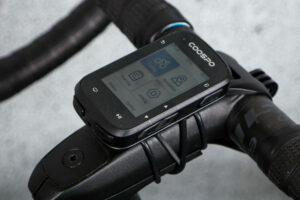
Very similar to the CS500, the CS300’s IPX7 waterproof computer body is getting on for 15mm thick with a footprint roughly 50 x 80mm. There’s a 2.6in screen and, around the edge of the device, there are three large buttons to access functions – this computer does not feature a touchscreen. In the box you’ll find rubber O-rings, a plastic Garmin-style handlebar mount, a USB-A to USB-C cable, and a little safety cord for the device.
Getting it set up is fairly straightforward. Follow the quick start-style manual to add sensors, input time zone, wheel size and calibrate power. However, for an easier and more complete set-up, I’d recommend pairing the CS300 with your phone via the CoospoRide app. With the app, you can organise your settings and also set up your dynamic zones.
Which leads us onto what you actually see on the CS300’s screen. There’s a choice of five different displays pages, each in default mode showing a selection of six different stats – lap is the only stat universal on all screens. However, via the CoospoRide app, you can customise these pages to feature whichever data you want.
Around the lap number, Coospo has also included a fine-line semi-circle. The more sectors of the semi-circle’s perimeter become shaded, the higher the dynamic zone you are working in. You can set your dynamic zones exactly as you want in the app. This is particularly useful as, when you pair it with extra sensors, you can use the CS300 for indoor training.
Right, that’s essentially the set-up all done. Time to hit the road.
On the road
In use, the CS300 is very straightforward and perfectly intuitive. You simply press the play/pause button to get a ride started. The screen is nicely visible, and alternating through the different data options is simple with the easy-to-access buttons.
While the experience of using the CS300 was largely excellent, I do have a couple of points to make. The auto-pause function makes obvious sense, should you stop mid-ride. But if you also have Auto Sleep selected, the display will switch off if you leave it long enough – so you’ll manually need to wake the computer up by pressing a button when you resume your ride.
The second small point is that the lap/dynamic zone data takes up a fair portion of screen real estate, yet, despite the display’s comprehensive customisation options, this is the one metric that you can’t switch out for any of the other options.
When you’re done with a ride, simply press and hold the play button for a few seconds to save your data. Then, if you’ve enabled auto sync in the settings, all your stats will be transferred to the Coospo App.
Within the Coospo App, you can see your ride route transposed onto a map, or look at your data in numerical or graph form. You can export your rides to your laptop as .fit files, and record rides as courses that you can then upload to navigational bike computers – such as the Coospo CS500 – should you want to follow the same route again.
If you hunt through the settings even more, you can also switch on Strava or TrainingPeaks app authorisation, so all your rides will sync with those systems.
Value
In terms of value, the CS300 is something of an outlier because there aren’t many options at this end of the market.
It is more than £20 dearer than the £44.99 Van Rysel Cyclometer GPS 100, but I think it offers far more than 20 quids’ worth of additional functionality.
In fact, probably its nearest rival is the £49 Coospo BC107 bike computer, which John really rated, but I think the CS300 outshines it. Or, of course, you could go deluxe with navigation and buy the £87 CS500.
Emma recently tested the navigation-free and also similarly basic Cateye Air GPS Cycle Computer, but this is a little more expensive at £79.99 and she wasn’t wowed by it.
Our best cycling computer buyer’s guide looks at the top tech out there from just £40 to well over £600.
Conclusion
In all, the CS300 does a fine job of providing not just ride fundamentals but really dialling down into added stats that can help guide your training. There’s always the temptation to think that more expensive equals better but, if you can put those kind of thoughts on hold, and if you’re serious about your cycling and you aren’t bothered about GPS navigation, you’ll be very pleasantly surprised by this excellent little computer.
Verdict
Simple but extremely effective GPS computer that can be a very useful aid for serious training – and at a great price
> Buy now: Coospo Realroad CS300 GPS Bike Computer for £45.49 from Bikeinn
All the deals displayed on our review pages are pulled from a constantly updating database feed of the best affiliate deals available. The criteria for deciding on what are the best deals is who is offering the lowest, delivered price. In most cases we will be showing the very best deal available online, but sometimes you may be able to find an item cheaper. If you can please feel free to post a link in the comments box below. To find out more about affiliate links on road.cc click here.
road.cc test report
Make and model: Coospo Realroad CS300 GPS Bike Computer
Size tested: One size
Tell us what the product is for and who it’s aimed at. What do the manufacturers say about it? How does that compare to your own feelings about it?
This is an entry-level GPS bike computer aimed at the novice cyclist, although with a range of features that would appeal to far more demanding users. Coospo doesn’t say much other than: “Capture accurate GPS data and train smarter with real-time metrics. Stay connected, sync with the CoospoRide app, and share your cycling adventures effortlessly!”
I’d say not completely ‘effortlessly’, but close enough.
Tell us some more about the technical aspects of the product?
Physical dimensions: 82.95 x 51.45 x 19.43mm [Official figures from Coospos – I actually measured it slightly smaller in all dimensions]
Display Size: 2.6in FSTN
Weight: 71g
Automatic backlight: Yes
Battery life: 40 hours with GPS
Charging time: 2 hours
Positioning system: GPS, BDS, QZSS
Charging interface: USB Type-C
Parameter available: 40+
A very simple but well-built piece of kit.
I think it does what it sets out to do very well. Increases in speed were shown promptly and I had no issues with its operation.
It’s IPX7 waterproof – meaning it can survive being submerged in water – and seems hardy.
70g is perfectly reasonable.
There aren’t a whole lot of GPS computers at this end of the market, let alone ones with as much functionality, so its value is excellent.
Tell us how the product performed overall when used for its designed purpose
Really very well. The CS300 does what it sets out to do very capably.
Tell us what you particularly liked about the product
Its simplicity and honesty. This is essentially like an old-school bike computer – albeit one that is GPS-informed and compatible with a range of extraneous sensors – that doesn’t get distracted by the bells and whistles of navigation.
Tell us what you particularly disliked about the product
I really would have liked a more comprehensive manual to really get to grips with all its capabilities.
How does the price compare to that of similar products in the market, including ones recently tested on road.cc?
In terms of value, the CS300 is something of an outlier because there aren’t many options at this end of the market. It is more than £20 dearer than the £44.99 Van Rysel Cyclometer GPS 100, but it offers far more functionality. In fact, probably its nearest rival is the £49 Coospo BC107 bike computer that John really rated, but I think the CS300 outshines it. Or, of course, you could go deluxe with navigation and buy the CS500.
Did you enjoy using the product? Yes
Would you consider buying the product? Yes
Would you recommend the product to a friend? Yes
Use this box to explain your overall score
This is a very proficient little GPS computer that will provide all the information you need to really advance your training, without any unnecessary gimmicks – and all for an excellent price.
About the tester
Age: 39 Height: 6’0 Weight: 16 stone
I usually ride: Islabikes Beinn 29 My best bike is: 25-year-old Dawes Galaxy
I’ve been riding for: Over 20 years I ride: Most days I would class myself as: Experienced
I regularly do the following types of riding: commuting, touring, sportives, general fitness riding, mtb, Leisure


11 thoughts on “Coospo Realroad CS300 GPS Bike Computer”
Its an Garmin’less Garmin for
Its an Garmin’less Garmin for a lot less Garmin money.
The review’s cnclusion:
The review’s cnclusion:
This is a very proficient little GPS computer that will provide all the information you need to really advance your training, without any unnecessary gimmicks – and all for an excellent price.
is accurate – no gimmicks, decent price. It always amuses me how every cyclist these days has a £300+ computer on their bars, capbale of navigating and data-reporting them around the planet, when they only ever ride the same half a dozen routes or so they know like the back of their hand.
Long ago I briefly used a bicycle computer to portray and gather “all the information I needed to advance ny training” (for actual road racing) but found that in practice I didn’t need that information because it didn’t advance my training. It was just a distraction and could even be a demotivator, as the slightest reduction in my performance reported gleefully by the gizmo could be something of a wet blanket.
I have read praise for these devices (bicycle computers) from cyclists who seem to have, effectively, found a new hobby called data-collection and journalising. They sometimes claim “its for my training” but in 90% of cases can’t really say what they’re training for. They don’t race or otherwise have some goal. Even the, “I want to improve” goal has likely been attained long ago and they’re in a steady state of fitness which, in truth, is all they really want or need to enjoy their cycling.
Marketing, eh!? 🙂
Cugel wrote:
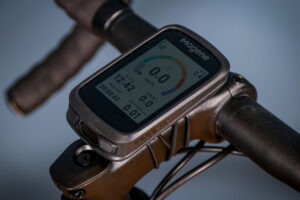
It always amuses me how you generalise about “every cyclist” at every opportunity as if every single one is a gullible consumerist fool apart from your wonderful wise self. Running my mind over the cyclists I know, I’d say roughly 75% don’t use any sort of computer, 10% use their phones and of the 15% who do have computers the vast majority have ones costing under £50 – I myself use a £29.99 Magene which does all I need, which is mainly log miles and make sure I don’t go too far into the red on heartrate. I only know three people who have super expensive gizmos, two are very keen racers and one…well he’s got more money than sense, I admit. So not really “every cyclist”.
Rendel Harris wrote:
Overpaid then 🙂
I get that with a XOSS head unit which cost less than half that !
Rendel Harris wrote:
For some reason, I’d got the feeling that you’re not really the ilk that ever feels amused. 🙂 Pompous and tending to the 6th form prefect approved by The Masters, perhaps…… . 🙂
Cugel wrote:
Something something glass houses something something stones.
At least we’ve all agreed
At least we’ve all agreed contributions have reached 6th-form level; an improvement on the year’s one-hit wonders?
There is an alternative view:
There is an alternative view: that the ‘gimmicks’ are really good. I used excellent little Cateye ‘computers’ for many years, without noticing how real cycle computers were advancing. I then took to calibrating the Cateye using GPS on the phone when I found that GPS kept giving the same distance for the same route. More years passed and I decided on a Garmin 1040 on Black Friday 2023, and it’s fantastically entertaining although mostly not ‘necessary’. Last September, I went Garstang- Wrynose & Hardknott- Whitehaven-C2C- Sunderland- Wensleydale- Garstang over 7 days. I made map .pdfs using screenshots from Bing Maps OS, but I didn’t have to use them because Garmin mapping is so good. The .gpx file I found for C2C proved to be a bit outdated, but it’s very well signed anyway. The Garmin really came into its own the day I arrived in Sunderland on Monday 23rd September- it was persistent moderately heavy rain (which was, I think, worse down south) and my rear mech broke in two in Roker. I bought another in Sunderland centre close to the main bridge over the Wear. It took ages to fit outside the shop in the rain, so it was after 2pm when I began the return trip and I let the Garmin choose my route to get me home via Wensleydale. It chose NCN 1, and I just followed it, not really knowing where I was going. Water was streaming down my glasses, and I would have missed many of the signs. For some odd reason, it’s only now that I have surveyed where I went- it’s pretty tortuous coming out of Sunderland- no wonder it took ages. I emerged from a cutting, and asked some young girls where I was- you’ll all know that these maps often don’t name the village where you are- it was Shotton Colliery, due west of Peterlee and I still can’t persuade the NCN map to name it. The girls directed me to the Co-Op, and just across the road I asked at a random house for some water. I regained the route and it was almost dark when I got the tent up in a muddy pea field, and placed the sodden clothes in a heap under the flysheet. Putting them on in the morning was a trial, but fortune smiled and there was better weather than forecast. Trusty Garmin guided me through Stockton on a long, tortuous but reliable route so I was only as far as my secret springy-turf windy site above Aysgarth that night- tent soon dried out. The moral is: the Garmin is expensive, but does the job when you need it in unfavourable conditions- it’s not just frippery
wtjs wrote:
Strangely, I’ve ridden all of those roads/routes you describe (and a lot more in Noerthern England) entirely without a gizmo of any kind, other than my memories of having got lost then found a few times when first traversing them. Well, plus memories of an OS map; and even – a time or three only – with an actual OS map in the jersey pocket (in a plastic bag – they can get soggy otherwise).
I wasn’t the only one! In them days, you couldn’t buy a bike computer, let alone a navigation device. How did we cope!? Very well, as it happens.
We coped by ejicating uz brains about how to cycle from here to there – a thing that happens less now, as many prefer to remain ignorant of the orienteering skills in preference for spending hundreds on a gizmo that keeps them ignorant and inept albeit with a head full of “data” that seems to be …. spurious.
Don’t worry, though, Rendered will be along in a sec to condemn my postings in favour of more consumption of gew-gaw as a “personal choice” not affected in the slightest by advert or fashion. 🙂
Well, I’m 72, so I’m the
Well, I’m 72, so I’m the wrong market for all this ‘eeeh, when I were a lad we didn’t even have bikes, only a couple of half coconut shells’ bollocks. I, too, have been all over t’north without a cycle computer, in the same way as I’ve been to the North Cape, over the Theodulpass from Zermatt to Arolla, the Sefinenfurka, … the Pennine Bridleway all without a cycle computer and using these mysterious ‘maps’. It’s just better with a computer – all I need now is for it to last a long time. There’s a reasonable chance of a few years.
Cugel wrote:
It’s a mark of how weak your pompous pontificating is that you’re forced to make up things I never said in order to try to defend your “look at me I’m like an elder statesman talking commonsense” rubbish. I said that your statement that “every cyclist these days has a £300+ computer on their bars” was bollocks, which it quite clearly is, and that most cyclists I know (and me) either don’t have a computer or are quite happy with budget models. I didn’t say anything in defence of expensive computers or about personal choice or in favour of more consumption, that’s just the usual bullshit you make up in your rather sad and pathetic attempts to bolster your self-selected “Ey oop, I’m the voice of reason me” persona.
Comments are closed.