


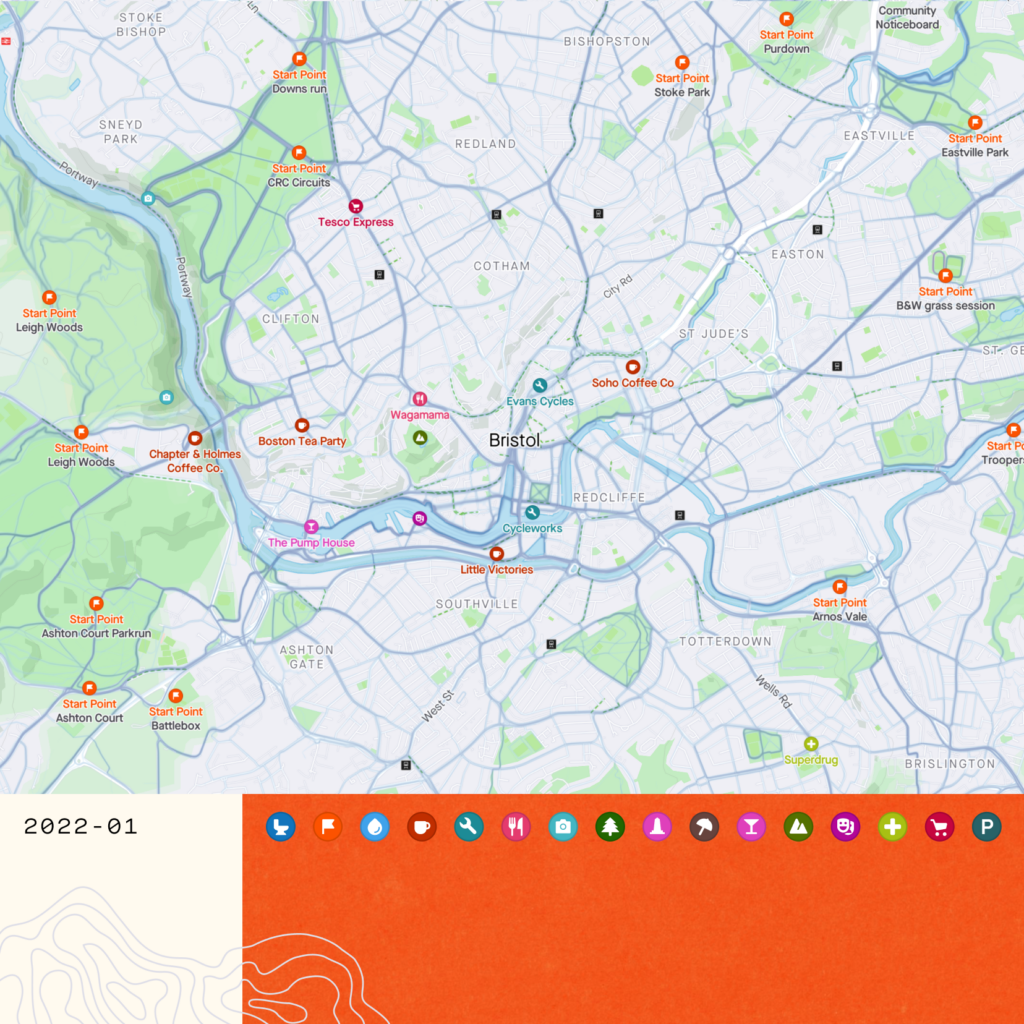

Strava is expanding its ‘Maps’ tool with ‘Points of Interest’ now highlighted on the map in the app and browser to help users plan where to go and find essentials while on the move.
> Strava Premium (annual subscription)
The social fitness giant says it has combined the Open Street Maps’ database with the heatmap of its 95 million global athletes to identify the most popular spots and locations to be marked out on the map for its users.
> Strava releases annual Year in Sport report revealing 2021 activity trends
When route planning, the base maps in the Strava app and on the browser now shows points of interest, which includes peaks, landmarks, photo spots, bike shops as well as popular start points.
“While on the move, athletes in need of toilet facilities, water refill, or a snack break can reroute themselves to points like a water fountain, service station, or cafe via the Maps tab when the need arises,” Strava adds.
> How to make the most of Strava’s exploring features for your next adventure
It’s accessible on the web via the ‘Routes’ function, and through the ‘Maps’ tab on mobile.
This new feature will be available for all athletes on the platform, whether you have a subscription or not.
The Points of Interest tool is the first update to the app this year. Last year’s biggest update was the new Group Challenges functionality which allowed riders to create competitions themselves against fellow Strava users for the first time.
Do you see yourself using this new function?

















16 thoughts on “Strava adds ‘Points of Interest’ to its mapping tool”
You can’t create/edit routes
You can’t create/edit routes as a free user
True, though you can explore
True, though you can explore the map on the mobile app.
visionset wrote:
Dont worry its virtually impossible to create a route as a paid user in the app too
Secret_squirrel wrote:
I’d hate for it to happen, but if strava bought RWGPS then you’d have all the heat data and the best planning software in one.
visionset wrote:
+1. Whenever I need to plan a route somewhere unknown, I have RWGPS and Strava Heatmaps arranged side-by-side on my desktop (and it’s all free if you want it to be).
HoarseMann wrote:
And Bing OS
Useful feature, especially
Useful feature, especially when cycling somewhere new as you can now easily see cafes/local supermarkets etc and plan where to stop.
matt_cycles wrote:
I’d agree, though looking in my area it’s a bit hit and miss what’s included, and also some of it’s out of date. The multiple “start points” just clog up the map without adding much value, in my opinion.
Steve K wrote:
Most of the ‘start points’ near me appear to be meeting points for club runs / parkruns. If you’re in that club / into parkrun you probably know where those points are already; If you’re not, they probably have little relevance to you, having been chosen as a convenient point for those people to gather / that activity to happen.
mdavidford wrote:
Ditto. They seem a bit pointless.
You’d question how old the
You’d question how old the data was then if it’s out of date locally for you. Must admit I’ve not checked my local area but will look later.
Wonder if you can toggle on/off certain bits then like ‘start points’ so they don’t clog the feed then.
It’s OpenStreetMap data, so
It’s OpenStreetMap data, so it’ll be as up to date as the submissions they get from their users, presumably.
It’s a bit temperamental as to what displays when – when I first looked at our town centre, only one of the two bike shops was showing. Only after zooming in and out a bit and looking at what else was there did the other one suddenly appear. As best I can work out, it’s decided I’d be more interested in the nearby Indian restaurant, and I have to have the zoom level and positioning just right to convince it to show both at the same time…
mdavidford wrote:
Not 100% OSM. The start points obviously arent.
Is there an option to turn
Is there an option to turn this s**t off?
Too many start points.
Edit: I apologise for not swearing ?
The 2019 Cycling UK best cafe
The 2019 Cycling UK best cafe in Scotland isn’t shown, and in the app you can’t tap on a Start Point to access a route, it seems. All a bit disappointing.
POI maps. Nothing gives me
POI maps. Nothing gives me greater pleasure than switching that layer off, if possible, so that my mapping is not cluttered by points that the marketing machine insists I find interesting.