




It’s no secret that times have been tough for digital publishers in recent years due to the rise of AI, and that includes independent cycling websites like road.cc. To make it a little easier to find cycling reviews, news and opinions you can trust, did you know you can add us as a Google Preferred Source, so road.cc shows up in Google’s top stories box? Now you do, and it just takes a couple of clicks to make it happen.
> Click here to make road.cc one of your preferred sources on Google
As an independent publisher, we can’t say we agree with our content being picked apart and dragged into Google’s Gemini-powered AI overviews, and that’s an issue we’re grappling with (our content director Tony Farrelly’s forthright thoughts on AI companies and LLMs appear in this Press Gazzette article if you’re interested) – but the search giant has at least appeared to acknowledge that it can be much tougher to find trustworthy information on its platform nowadays, and Preferred Sources is a bit of a sticking plaster to make your Google search experience more personalised and (hopefully) more useful.
Some of you might have moved to a different search engine long ago, but the reality is that Google still serves as the front page of the internet for the vast majority of people across the globe, which is why we want to make sure you can find us via your Google searches for all things cycling.
How to set your Google Preferred Sources
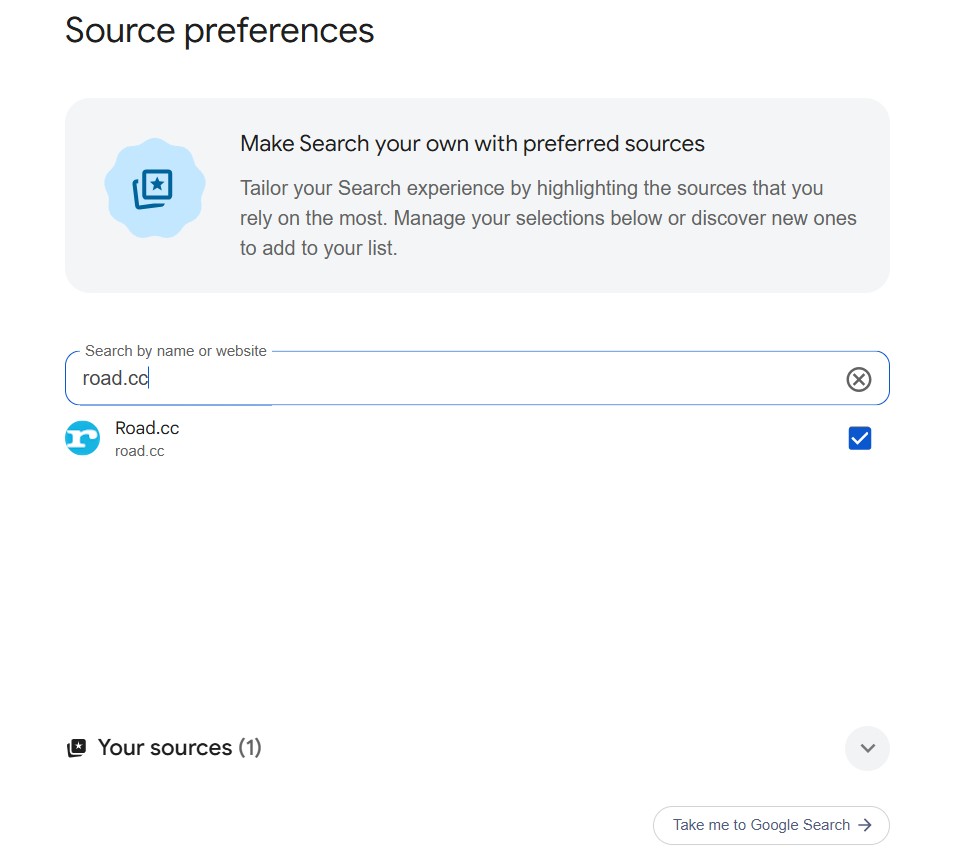
We’ve already added a preferred source button to the bottom of each page on road.cc, and there are also plenty of links to it in this article (here’s another). All you have to do is click the link, tick the box, and road.cc will be prioritised in your top stories box when you search for something that we’ve written about. You still may get an AI overview and links to websites you’re less familiar with, but adding preferred sources is a useful way of making sure most of the websites underneath are ones you trust.

The other way is from Google’s top stories box itself – click the star icon next to top stories and it will take you to the preferred sources page. From here, just start typing in the name of the website you want to make a preferred source and tick the box.
Other websites are available of course, and as much as we’d love for road.cc to be your only preferred source on Google, we’d recommend building a list of reputable websites on a range of topics that you visit a lot/are particularly useful to you to make for a better Google search experience. Our video guy Liam has added numerous websites to get his daily dose of Taylor Swift-related news, for example…
If you’ve already made road.cc a preferred source, we appreciate it!
> Make road.cc a preferred source on Google
Are you already using Google Preferred Sources? Any questions? We’d appreciate your thoughts in the comments as always.























6 thoughts on “Tired of AI hallucinations getting in the way when searching for cycling news and advice? Add road.cc as a preferred source on Google”
The appropriate response to Google pissing on your cereal is not a fancy new sugar that removes the taste of urine.
Stop using Google products where you can. Firefox browser and DuckDuckGo search engine have had noticeable upticks in market share by explicitly NOT pushing AI.
@ROOTminus1 Plus 1 from me.
I’d also add “LibreWolf” – Firefox fork that is focused on privacy and security. It adds some things like letterboxing to defeat fingerprinting by screen size, deletes most cookies on close by default, has other privacy protection mechanisms.
Google is broken. Even if they are forced to roll back on the made up summary (a German court said it was original content so they’re liable), it will still be a front page of SEO slop. Images full of geometry nightmares.
Another vote for switching search to DuckDuckGo. You can turn all the crap off in Settings. Ah, bliss.
…Great to read that Roadcc will never use AI. As such I will keep reading.
Another vote for DuckDuckGo. But they still continue to send me the same search results that I’ve already seen over and over, as if ‘search’ means look at what I’ve already been directed too, LOL. At least theoretically AI isn’t surveilling me on DDG.
…AI is digital colonialism, cultural and identity theft, and the scourge of the quarter century.
@GravelIsNothingNew nearly, but not quite.
PS Roadcc would be improved if it allowed readers to edit their comments to correct errors, typos, etc.