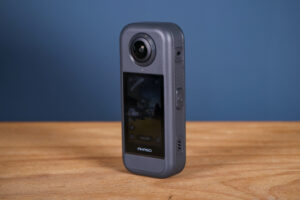
The Osmo 360 is drone giant, DJI’s first crack at the 360-degree formula. Although the quality of its footage isn’t quite class-leading, its appeal lies in its comparatively small packaging, ease of use, and its competitive price point, all while packing all of the features found elsewhere. That said, its companion apps take a good bit of learning, and its battery life isn’t quite up there with the greats.
- “YouTube alone is getting harder to make a career of”: The reality of being a cycling YouTuber
- DJI Osmo Action 4 action camera review – Powerful but modestly priced
- On and off the Record with Stu Thomson of Cut Media
DJI Osmo 360 – Technical details
Housed inside its 61 x 36.3 x 81mm casing, the Osmo 360 packs a 1/1.1-inch CMOS sensor that’s capable of capturing footage of up to 8k and 50 fps while in 360 mode. It’s not all about filming footage that most common screens can’t run either, as it can also shoot 4k at up to 100fps, all while filming in 360 degrees. This mode opens up slow-motion opportunities, if you’re looking to get extra fancy.

As well as 10-bit and D-Log M colour modes, the Osmo 360 promises excellent low light performance, crediting its f/1.9 aperture, pair of 1-inch 360-degree image fields, and SuperNight mode. Of course, the camera can also take stills up to 120MP, or 16k in resolution, and yep, that’s in 360 mode too.
If your chosen filming scenario doesn’t call for the might of a 360-degree view, this camera can be flicked to a single lens mode, which performs and acts very similarly to DJI’s Osmo Action cameras. That grants the user up to a 170-degree wide field of view, and 5k shooting at 60fps, depending on whether you’re using the regular single-lens mode or Boost Video.

DJI then says that the Osmo 360 can film at 8k/30fps for 100 minutes without stopping. That’s all, while filling its 105GB of built-in storage, so while it does have a slot for a micro SD card, it’s not totally necessary, and to be honest, I’ve never used one in this camera.
As for sound, that’s recorded via four internal microphones, while there are advanced wind noise reduction features and connectivity to DJI’s range of wireless microphones.
Owing to the fact that this is a 360 camera, there’s a cacophony of stabilisation features. As seen on the brand’s Osmo Action cameras again, there are the brand’s HorizonSteady and RockSteady 3.0. The former levels the horizon completely, while the latter reduces camera shake. These are available when shooting in the single lens mode, however, RockSteady can be applied to 360 footage through the Mimo app.

Both of these stabilisation features can be added onto any footage after recording, too – the joys of a 360 camera. That’s through either the phone-based or desktop Mimo app, although HorizonSteady will need to be applied on the camera itself. Through these, you can tweak your footage’s exposure, saturation, and the like, while trimming, cutting, and splicing to suit your video. It also allows the user to pick the aspect ratio of which they would like the video to be exported, so there’s an awful lot a flexibility to play with.
As for size, it measures 61mm in width and 81mm in height.
DJI Omso 360 – Performance
Given that DJI has created five Osmo Action cameras now, it’s safe to say that the brand has nailed its on-camera user interface. Just like those cameras, the Osmo 360 requires a number a swipes on its touch screen to access all of its options. Swipe from the right, and you’ll get your technical settings, from the left, your gallery, from the bottom, your lens and quality settings, and from the top, your options menu. DJI hasn’t skimped on the screen either. Although it’s not as large as competitors’ screens, its touch feedback is responsive, and its size is just enough to provide a good idea of what you’re filming.
From there, it’s all pretty simple. Tap the circle button to start filming, press it again to turn it off.
The simplicity does go AWOL somewhat once you’re pulling footage off the camera and onto the phone or desktop app. That’s just because the app isn’t the smoothest of experiences. It does get a lot of very useful features, but some, like Direction Lock, are hidden within multi-paned menus, and some descriptions aren’t quite descriptive enough. However, with time, you will come to learn the Mimo app’s quirks and gel with what it has to offer.
Additionally, the app also takes up a lot of a phone’s processing power. Admittedly, my smartphone isn’t the most gucci thing out there, but it’s far from prehistoric. But when editing and reviewing footage through it, the phone gets hot, and the smoothness of the footage diminishes greatly, even when it’s set to reduce the image quality to boost smoothness.
But as this is a 360 camera, the Mimo app is a must-have as it unlocks all of the creativity and adaptability that the Osmo 360 can offer. From it, you’ll be able to choose the orientation of your aspect ratio and what part of the footage you actually want to look at, and add some stabilisation features. Mimo also brings plenty of image adjustments, so you can really dial in how you want your footage to look.

And that’s a very useful tool because compared to pricier options on the market, its dynamic range isn’t as wide, mostly towards the highlights end of the scale. Because of this, bright skies can be blown out (completely white) compared to darker forested areas. This can be fixed to a point in Mimo, however, straight out of the camera, it leaves something to be desired.
The camera falls slightly short when shooting in darker environments, too. Through tree cover, it’s far from bad, but when it’s particularly dark, some image noise can creep in.
Though the image quality itself is pretty darn good. Able to shoot in 8k and 4k resolutions, depending on other settings, brings sharp and crisp quality to the footage. Colour, without any post-editing, is good too. In fact, if you know how footage shot on a DJI Osmo camera looks, that’s what you’re doing to get with the Osmo 360. It produces good virbance without being oversaturated, and the D-Log setting flattens the colour (image above) and contrast a lot, providing a solid platform for deeper colour grading and exposure fettling.
As for stabilisation, well, that’s what cyclists will appreciate a 360 camera for the most. Apart from a bit of flapping caused by the camera being attached to a looser chest mount, stabilisation is spot on. This can then be boosted in the app, and if you want to use the single-lens mode, the camera acts like a regular Osmo Action, where you can take advantage of the renowned HorizonLock and RockSteady stabilisation modes. Both of these do crop into the footage to a varying degree, depending on the mode you choose, but it’s unlikely these modes will be used for on-bike footage, or at all.
DJI Osmo 360 – Verdict
While the Osmo 360 has its pros and cons, something that will make it appealing against competitors is its price of £410 for the camera itself. The Insta X5 in its standard bundle will set you back £520. It does provide better-looking footage straight from the camera, and its app is more user-friendly, but it’s an overall longer camera, so it can get unwieldy when mounted under a helmet’s visor or on a chest mount, and it’s not quite as good with wind noise. However, the X5’s battery lasts longer while recording.
GoPro’s MAX is £350 and is the real competitor as its casing is of a similar size to the Osmo’s, if a bit smaller at 71.45mm tall and 65.15mm wide. But it’s not quite as powerful as it can record at 5.6k and 4k resolutions.
With its 8k resolution, the DJI Osmo 360 is one powerful bit of kit that opens up the possibilities only available with a 360 camera. The overall quality of its footage is great, though not quite up to the likes of the Insta360 X5, but it’s a much more affordable offering. Its more compact size will be more appealing and manageable for cyclists, too. Although its app takes some learning, the camera itself is user-friendly and a lot of fun to use.
All the deals displayed on our review pages are pulled from a constantly updating database feed of the best affiliate deals available. The criteria for deciding on what are the best deals is who is offering the lowest, delivered price. In most cases we will be showing the very best deal available online, but sometimes you may be able to find an item cheaper. If you can please feel free to post a link in the comments box below. To find out more about affiliate links on road.cc click here.