



Easy enough for a beginner to get to grips with, but with enough depth and compatibility to satisfy more demanding riders, the Magene C506 is a pleasingly straightforward way to obtain performance data on training loops, turbo sessions and even while following fully mapped new routes.
> Buy now: Magene C506 for £109 from Magene
The smartphone has a lot to answer for. But possibly the most heinous outcome of its invention – aside from the anxiety epidemic amongst youngsters, obviously – is the fact that, for many people, it has almost completely removed the need for a bike computer.
Why buy a dedicated device when the thing in your pocket can sit on the handlebar and do most of the same jobs?


As an old-school cyclist with many of the incumbent personality traits – most importantly, short arms and deep pockets – I’m sympathetic to that line of thinking, but Magene’s C506 puts up a persuasive counter argument. By fitting this to your bike, you can have access to all the data you want on a ride, in an attractive package, without being bothered by calls, texts, emails, and so on.
Setup
Initial setup is straightforward, although it does require a software update to be downloaded, and a map download if you want to use route functions. For all that talk of smartphone negativity, you will also have to pair it with your phone and install the OnelapFit app. The app, like the C506 device itself, is fairly attractive and intuitive and you should easily be able to navigate your way around it.
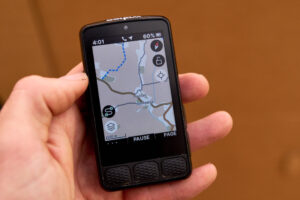
The 2.4in colour touchscreen is rather good at this price point and even renders route map graphics well. The only slight negative is that it’s not super quick to react to touches. Even without gloves on, I’ve occasionally had to prod the screen a few times to do what I wanted.
The C506’s home menu is a simple affair with total distance covered, total time you’ve spent riding, and different folders for your different types of activity. Magene has already created Road and Commute folders, but you can specify your own other options. The home screen also has options for adding sensors, indoor training, route selection, settings and smart assistance.
This last choice is interesting because you can do things like set the C506 to tell you when target heart rate is exceeded – if paired with a heart rate sensor – or remind you when you need to hydrate. Or you can pair it with devices like Magene’s smart headlights to allow automatic headlight operation.
If you would rather just stick it on the bike and get going, select Road, then start. The default in-ride mode allows you to swipe laterally through five screens: a five-window dashboard with current speed prominent; a seven-window dashboard with elevation prominent; a local map screen; a nine-window dashboard with power prominent (although you’ll need to connect a power meter); and a lap screen.
By using the OnelapFit app, you can customise these different screens to show whatever data you want. Should you choose to create your own subset folder of riding – à la Road or Commuting – you start with a blank canvas to create the in-ride dashboard pages exactly as you would like.
In use
So you can play about with the setup at your leisure, but how does the C506 work in action? It’s actually very good. Initially, I was slightly concerned that viewing the screen would be an issue on a bright day, but the C506’s ambient light sensor altered screen brightness well. On the move, I found readouts for things like changes in speed came through quickly and accurately. The Autopause when you come to a rest is pretty sharp to stop and get going again, too.
When the ride is properly over, a quick press of the lower right physical button – there are three physical buttons around the device – told the C506 the fun was up. Then a couple of dabs at the screen confirmed ride end. Once we were back on Wi-Fi, ride data was seamlessly transferred to the OnelapFit app on my phone.
If you want to really make the most of the C506’s navigation talents, you can upload routes to follow. Or, by using the OnelapFit app, you can also turn the ride you’ve just done into a route and reimport it for future use. And as well as British maps, you can also download maps from almost anywhere else in the world. And it’ll display text in Spanish, Portuguese, German, French, Italian, Polish, Traditional Chinese, Korean, Japanese or Russian.
However, if exploring the world seems like too much hard work, you can take the ‘easy’ option with home training. By uploading your route files, you can relive your real world rides on the turbo, or you can upload other GPX files or sync courses directly from the TrainingPeaks app. And with the C506’s ANT+ and Bluetooth capabilities, it means you can connect to smart trainers, as well as on-bike kit such as speed sensors, cadence sensors, heart rate monitors, power meters, smart lights, and SRAM eTap and Shimano Di2 electronic shifting systems.
Mount
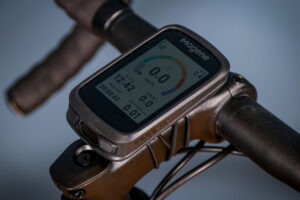
Our test unit came with a Garmin-style out-front mount, pictured below, but the C506 ships with a more basic bar mount – and the alternative out-front one, which was available as an aftermarket purchase, isn’t currently listed on Magene’s website.
Value
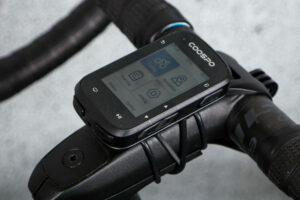
The C506’s asking price of £109 includes the fairly basic bar mount and a USB-C charging cable. After testing the now £68ish (at RRP) Coospo Realroad CS500 earlier in the year – with its very rudimentary monochrome snake-like navigation graphics – I think the Magene C506 feels like a significantly more sophisticated product. Yes, it is almost £40 more, but I think that is well worth it. It might not be a high-end Garmin product but it at least feels like it’s in the same species group.
For more options, check out our guide to the best cycling computers, and for GPS on a budget, our best cheap cycling computers buyer’s guide.
Conclusion
Overall, then, Magene’s C506 can do as much or as little as you’d like it to. As a standalone bike computer it’s a very solid piece of kit that will enhance your ability to keep a riding diary without too many techno headaches. But if you want to do a little more advanced training, or head further afield with its mapping and navigation abilities, it’s a very attractive budget option that doesn’t actually feel that ‘budget’.
> Buy now: Magene C506 for £109 from Magene
Verdict
Sophisticated little budget computer that’s easy to use despite also having fairly extensive capabilities
All the deals displayed on our review pages are pulled from a constantly updating database feed of the best affiliate deals available. The criteria for deciding on what are the best deals is who is offering the lowest, delivered price. In most cases we will be showing the very best deal available online, but sometimes you may be able to find an item cheaper. If you can please feel free to post a link in the comments box below. To find out more about affiliate links on road.cc click here.
road.cc test report
Make and model: Magene C506 Smart GPS Bike Computer
Size tested: N/A
Tell us what the product is for and who it’s aimed at. What do the manufacturers say about it? How does that compare to your own feelings about it?
This is a well-specced albeit budget bike computer primarily aimed at the novice cyclist, although it has capabilities that would satisfy even demanding users.
Magene says: “The Magene C506 smart GPS bike computer stands out as a compact, mighty gear that combines every aspect of an ideal ride. It packs a 2.4″ color touchscreen, colorful map navigation with off-course alerts, and seamless integration across various Magene’s devices.”
Tell us some more about the technical aspects of the product?
Dimensions: 78 x 48 x 17.5mm
Screen size: 2.4in
Physical buttons: 3
Riding modes: 2 default, 10 custom
Data types: 105
Waterproof rating: IPX7
Charging: USB C
Battery life: 17 hours (can be extended to 24 hours in battery save)
Charging time: 3 hours
Connectivity: WiFi, Bluetooth 5.0, ANT+
Storage: 4GB
Other features: Autopause; navigation
Pretty standard construction for a budget computer – i.e. plastic casing with protected charging port – although perfectly decent.
I was very impressed with the C506’s general performance. The colour display was attractive and it reacted to changes in ride performance well. The only negative is the touchscreen can be slightly unresponsive at times.
Seems solid.
After testing the now £68 (ish) Coospo Realroad CS500 earlier in the year – with its very rudimentary monochrome snake-like navigation graphics – I think the Magene C506 feels like a significantly more sophisticated product. Yes, it’s around £40 more, but I think it’s worth it. It might not be a high-end Garmin product but it at least feels like it’s in the same species group.
Tell us how the product performed overall when used for its designed purpose
It was very good – I was very impressed with performance both on the ride and then accessing data afterwards. Once set up – which was straightforward – it all worked intuitively and seamlessly.
Tell us what you particularly liked about the product
I think the user interface and general feel of the product is very good. As I said, it’s no high-end device, but you certainly don’t feel like it’s a bargain-bin option either.
Tell us what you particularly disliked about the product
The hesitant touchscreen can be a pain. You do learn to maximise its operation, though, with quick dabs at the screen.
Did you enjoy using the product? Yes
Would you consider buying the product? Yes
Would you recommend the product to a friend? Yes
Use this box to explain your overall score
As an entry-level bike computer, with the capability to do a lot more, I think the Magee C506 is very good. Best of all, it doesn’t feel like a budget option – the user interface is attractive enough, data is transferred faultlessly between device and app, and setting it up is very straightforward.
About the tester
Age: 39 Height: 6’0 Weight: 16 stone
I usually ride: Islabikes Beinn 29 My best bike is: 25-year-old Dawes Galaxy
I’ve been riding for: Over 20 years I ride: Most days I would class myself as: Experienced
I regularly do the following types of riding: commuting, touring, sportives, general fitness riding, mtb, Leisure


15 thoughts on “Magene C506 Smart GPS Bike Computer”
Um phones have crap battery
Um phones have crap battery life running always on screens and GPS tracking and you risk smashing your precious rather than a cheaper bit dedicated of kit. Plus phones dont support ANT.
These are the main reasons.
Good review though.
People need to realise a
People need to realise a smart phone is a Jack of all trades. Its mediocre at a million things. And being a bike computer is not a great use of a smartphone for the reasons you state plus many more.
Realise I’m probably in the
Realise I’m probably in the minority, but my phone was only marginally more expensive than this, and a good deal cheaper than the Garmin / Wahoo etc.
quiff wrote:
Mine cost less than this – considerably less, actually, but I don’t really care about phones, regarding expensive ones as things that would absorb money I could spend on cycling instead. They do make rubbish bike computers though, I experimented a while ago with a surplus-to-requirements iPhone with a Garmin mount on the back; in light use as a phone it needed charging maybe once every 36 hours, running Strava and a GPS mapping app simultaneously as a bike computer it barely made it over 150 minutes on a full charge.
I’ve logged 12+ hour rides on
I’ve logged 12+ hour rides on my phone without running the battery flat. Most accessories these days support Bluetooth. If you don’t want to use a phone, fine, but the arguments against are narrower than you think.
adamrice wrote:
Was that just logging a ride on Strava though or actually using the phone as a head unit, i.e. having the display permanently on and giving you directions as well? Strava isn’t very battery-hungry on its own but GPS navigation and an always-on screen is, at least with the phones I’ve tried.
That’s using the phone as a
That’s using the phone as a head unit, with the screen mostly off, receiving periodic spoken stats updates and turn-by-turn directions via a headset. I’m not even on Strava.
After 10 years I finally got
After 10 years I finally got a new one which costs more than this but my old phone was never used for bar navigation for the other reasons you say and that I risked smashing up the thing I needed in emergencies!
Sounds interesting a but a
Sounds interesting a but a basic question is not answered: how easy to integrate with Strava ?
Miller wrote:
I have a computer, not Magene but seemingly very similar to it, that uses the same OneLapFit app and that synchronises very easily with Strava: you just authorise in the app for your rides to be sent to Strava then every time you open the app when the computer is on and nearby it automatically downloads all your ride data from the computer to your phone and then sends it on to Strava automatically.
Agree – you’d think a cycling
Agree – you’d think a cycling journalist would know this is essentiall info.
The mount situation isn’t made entirely clear either. It would seem the Magene isn’t compatible with Garmin (or Wahoo) mounts though.
Surreyrider wrote:
It says it has a “Garmin-style mount” which implies compatibility, no? the mount certainly looks identical to a Garmin one and the Magene products I’ve had in the past have always been compatible with Garmin mounts.
I have one of these, it uses
I have one of these, it uses the usual Garmin mount. Rides sync with Strava no problem
It does look very similar to
It does look very similar to a Garmin Edge 530/830. Almost too similar but if it does the important things well then this should be a winner for those looking for a good computer thats not silly money. The aforementioned edge 530 still goes for well over £150 used on ebay and the like quite regularly.
I’d been looking at the C606
I’d been looking at the C606 as a replacement to my ageing Edge 500, does anyone have any experience with that, or even know what the differences are? the small price jump between the 506 & 606 almost make it a no brainer.
The review on here of the 606 last year seemed positive on the hardware but marked it down quite heavily for the app functionality etc, does that appear to be resolved? I’m assuming they’re using essentially the same support app.